> ## Documentation Index
> Fetch the complete documentation index at: https://docs.nonce.app/llms.txt
> Use this file to discover all available pages before exploring further.

# 配置矿池

> 批量修改矿池连接

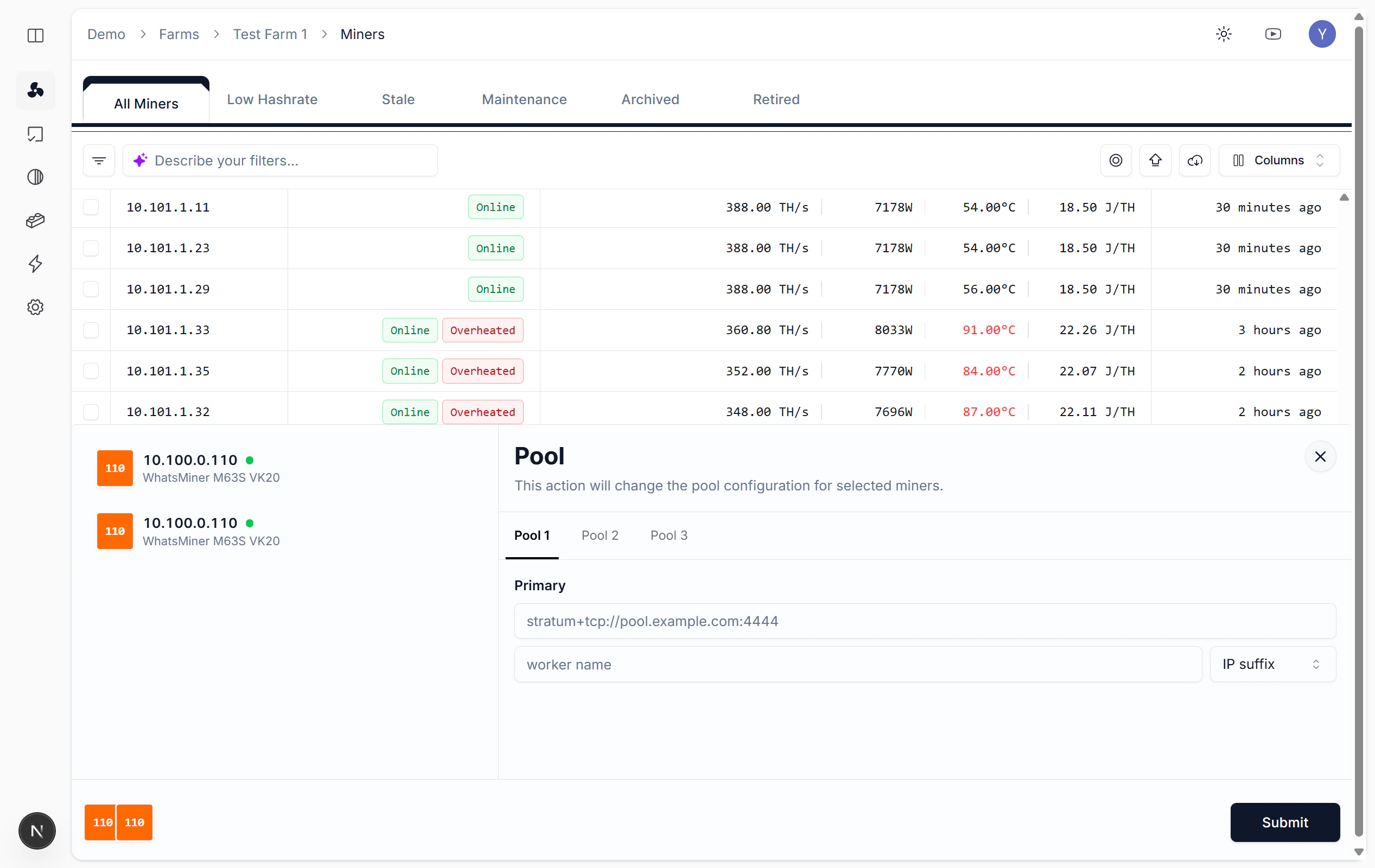
切换矿池或修改 Worker 配置时，可批量修改矿池连接。

## 操作步骤

批量操作 → 选择「Pool」 → 选中主要/备用矿池，填入 URL 和 Worker Name → 提交。

<Frame caption="配置矿池连接">
  <img src="https://mintcdn.com/nonce/d9V7X7bPIpeRFAUo/images/operations/operation-pool-4.png?fit=max&auto=format&n=d9V7X7bPIpeRFAUo&q=85&s=ee33bce779a86899757eb7214a4f1576" alt="批量操作菜单中配置矿池" width="2534" height="1600" data-path="images/operations/operation-pool-4.png" />
</Frame>